Extra Report Pad ไดอารี่ของเทรดเดอร์ (Trader’s Diary) นี่คือแผงสถิติ (Statistics) ที่ให้การวิเคราะห์บัญชีเทรดของคุณสำหรับ MetaTrader (เมตาเทรดเดอร์)
ผลการวิเคราะห์จะแสดงบนกราฟในโหมดเรียลไทม์ (Real-time) การเทรดหลายสกุลเงินเป็นที่นิยมอย่างมาก อย่างไรก็ตาม ยิ่งมีจำนวนการเทรดมากเท่าไร การวิเคราะห์ความสามารถในการทำกำไร (Profit) ของแต่ละการเทรดก็ยิ่งยากขึ้นเท่านั้น การวิเคราะห์การเทรดอย่างมืออาชีพตามเดือนและการคำนวณสถิติต่อการเทรดเป็นงานที่ท้าทายมากยิ่งขึ้น แผง Extra Report Pad นำเสนอโซลูชันที่มีประสิทธิภาพสำหรับการวิเคราะห์บัญชีของคุณและการเตรียมสถิติโดยละเอียดในโหมดเรียลไทม์ในรูปแบบ HTML (เอชทีเอ็มแอล), CSV (ซีเอสวี) หรือกราฟ (Graph) เหมือนกับ MyFxBook (มายเอฟเอ็กซ์บุ๊ก) หากคุณต้องการทำความเข้าใจอย่างครอบคลุมเกี่ยวกับประสิทธิภาพของระบบการเทรดของคุณ มีเครื่องมือมากมายที่สามารถช่วยให้คุณบรรลุเป้าหมายนี้ได้ Extra Report Pad ประกอบด้วย รายงาน (Report), สถิติ, myfxbook, บันทึกการเทรด (Trading Journal), การวิเคราะห์บัญชี (Account analysis), สถิติประสิทธิภาพ (Performance statistics), การวิเคราะห์ (Analytics) และ แดชบอร์ด (Dashboard) ที่เป็นนวัตกรรมใหม่ โดยการใช้ Extra Report Pad คุณสามารถวิเคราะห์ประสิทธิภาพของระบบการเทรดของคุณได้อย่างละเอียดและได้รับข้อมูลเชิงลึกที่มีค่าเกี่ยวกับจุดแข็งและจุดอ่อนที่อาจเกิดขึ้น
ไม่ว่าคุณจะเป็นเทรดเดอร์ใหม่ที่ต้องการปรับปรุงประสิทธิภาพของคุณ หรือเทรดเดอร์ที่มีประสบการณ์ที่ต้องการปรับกลยุทธ์การเทรดของคุณให้เหมาะสมที่สุด Extra Report Pad เหล่านี้สามารถให้ข้อมูลที่คุณต้องการเพื่อทำการตัดสินใจอย่างมีข้อมูลและบรรลุเป้าหมายทางการเงินของคุณ
Extra Report Pad ทำงานอย่างไร?
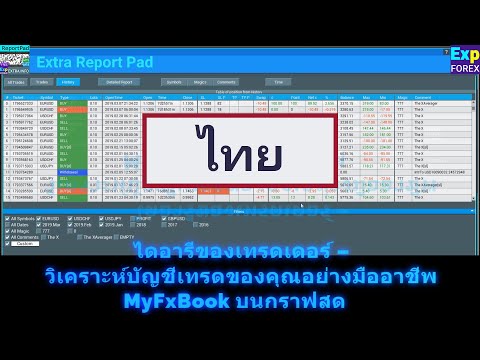
Extra Report Pad ไดอารี่ของเทรดเดอร์ – วิเคราะห์บัญชีการเทรดของคุณอย่างมืออาชีพ MyFxBook ในกราฟสด
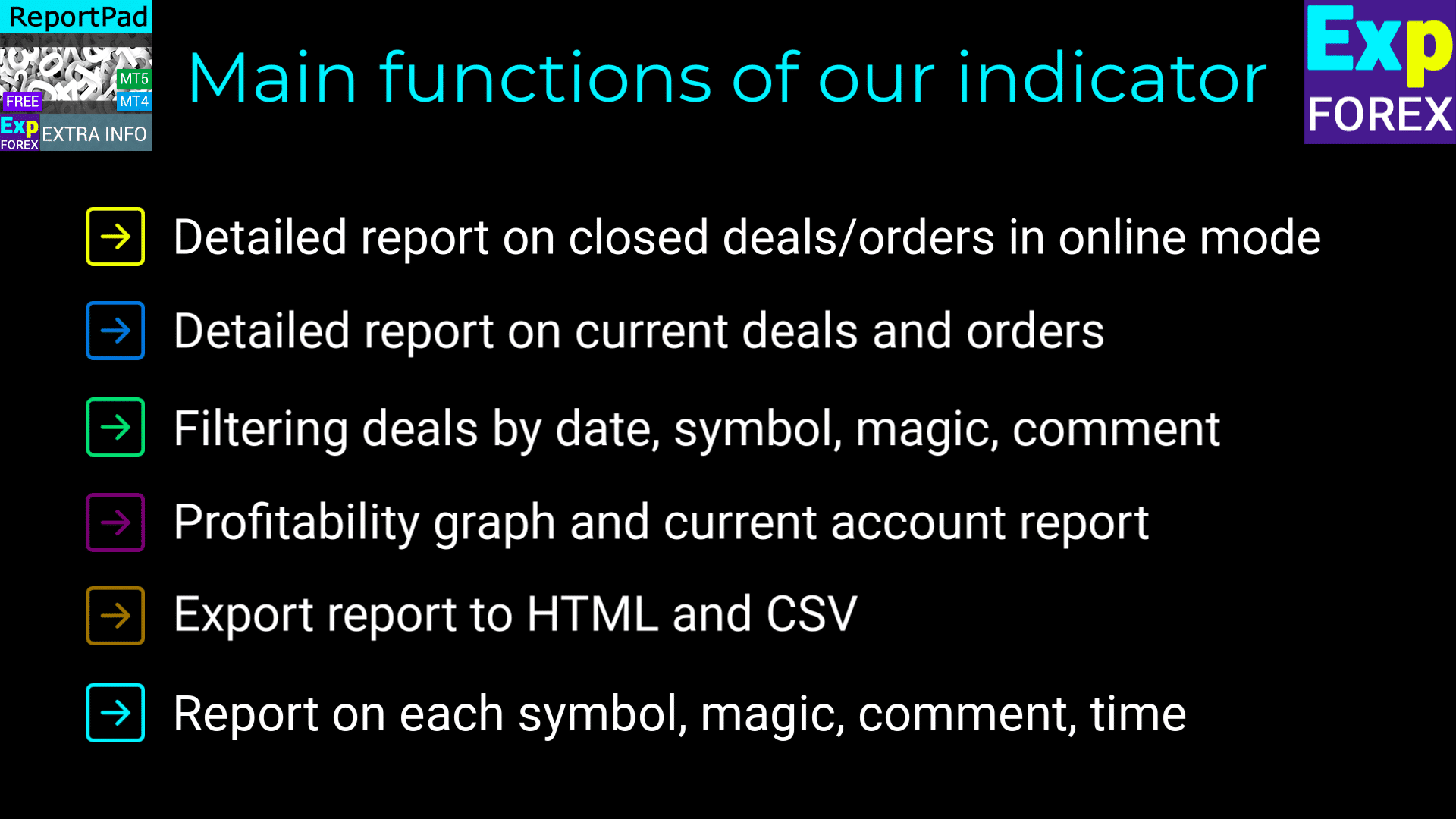
ฟังก์ชันหลักของ Extra Report Pad
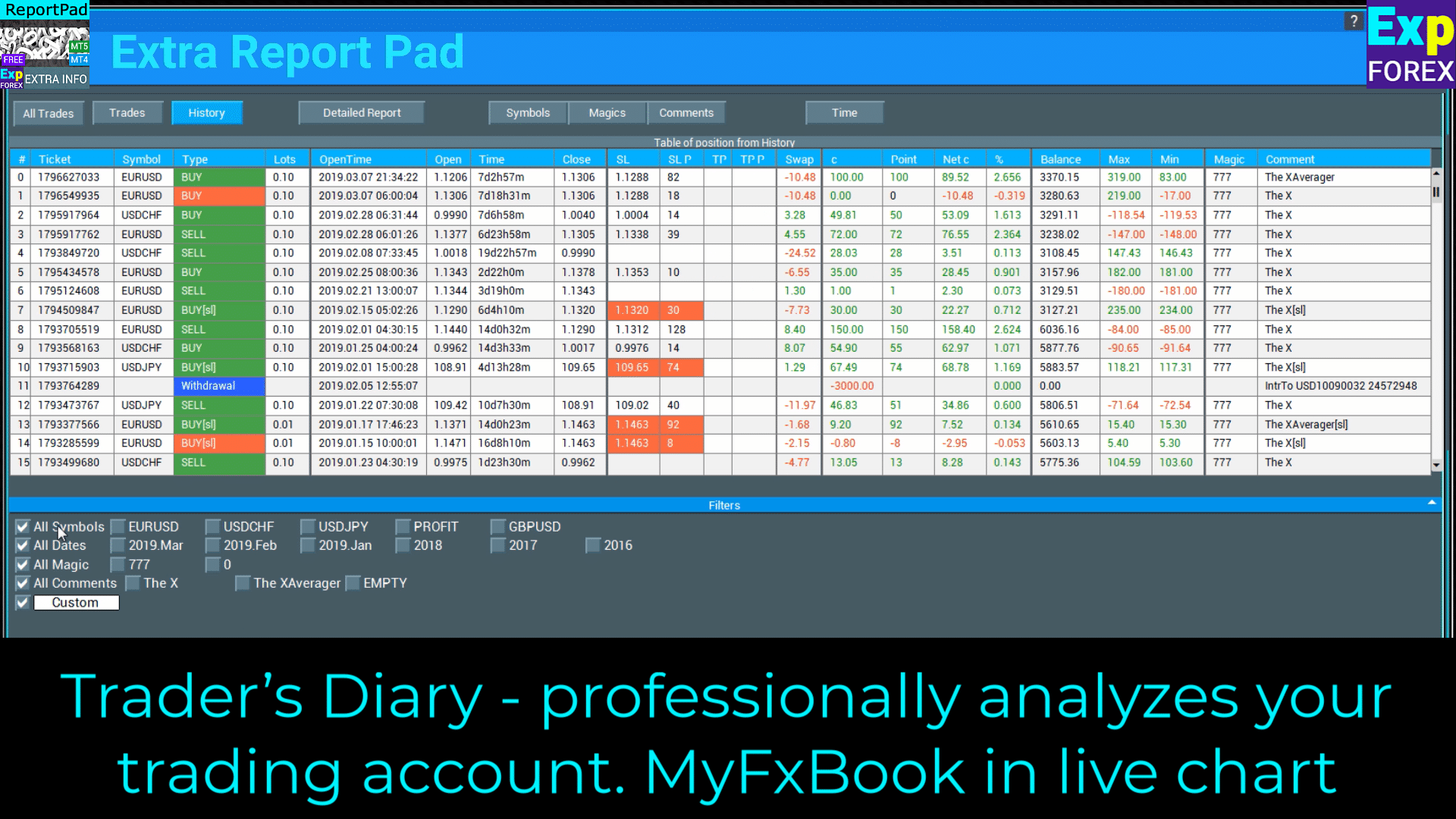
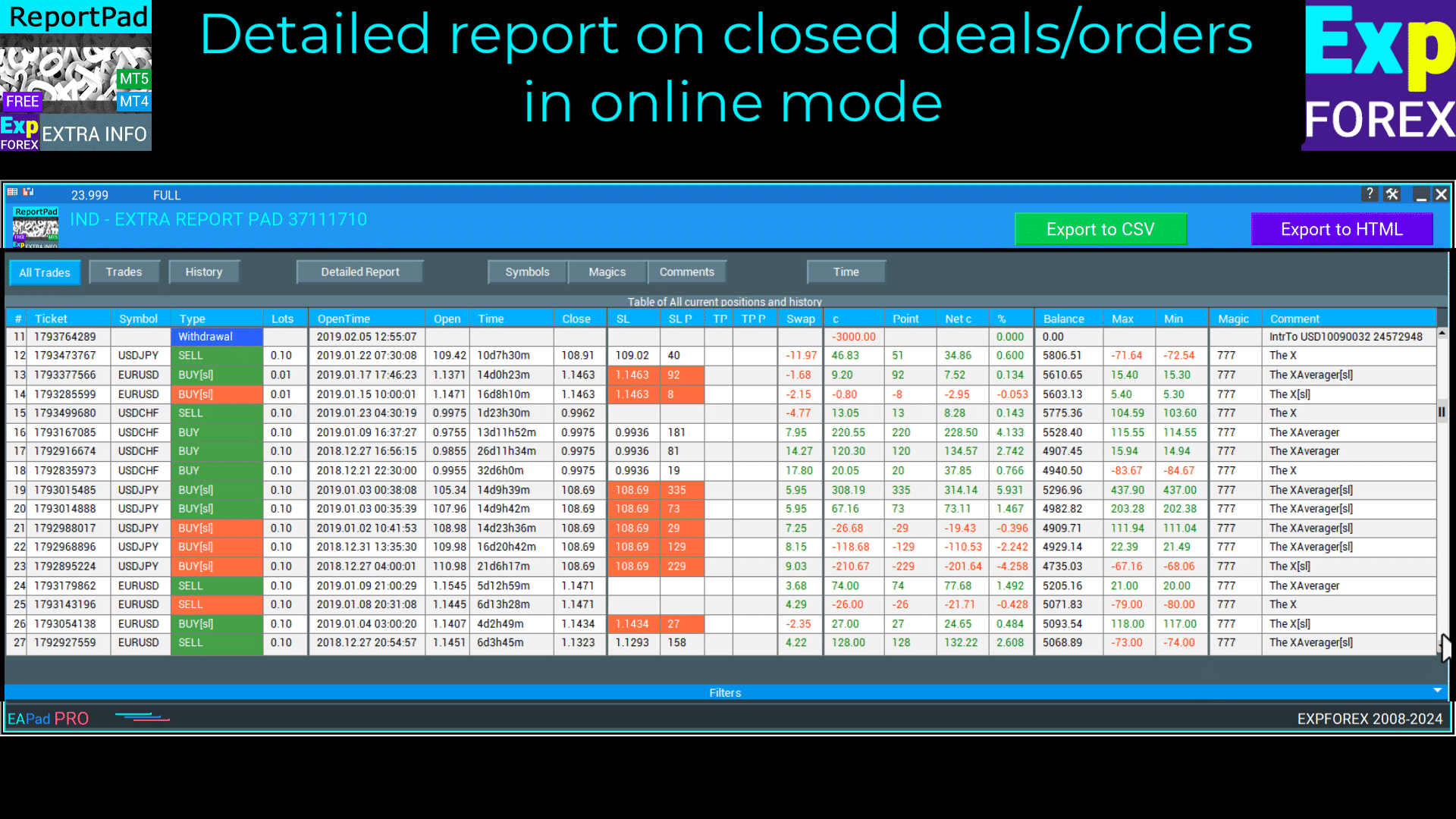
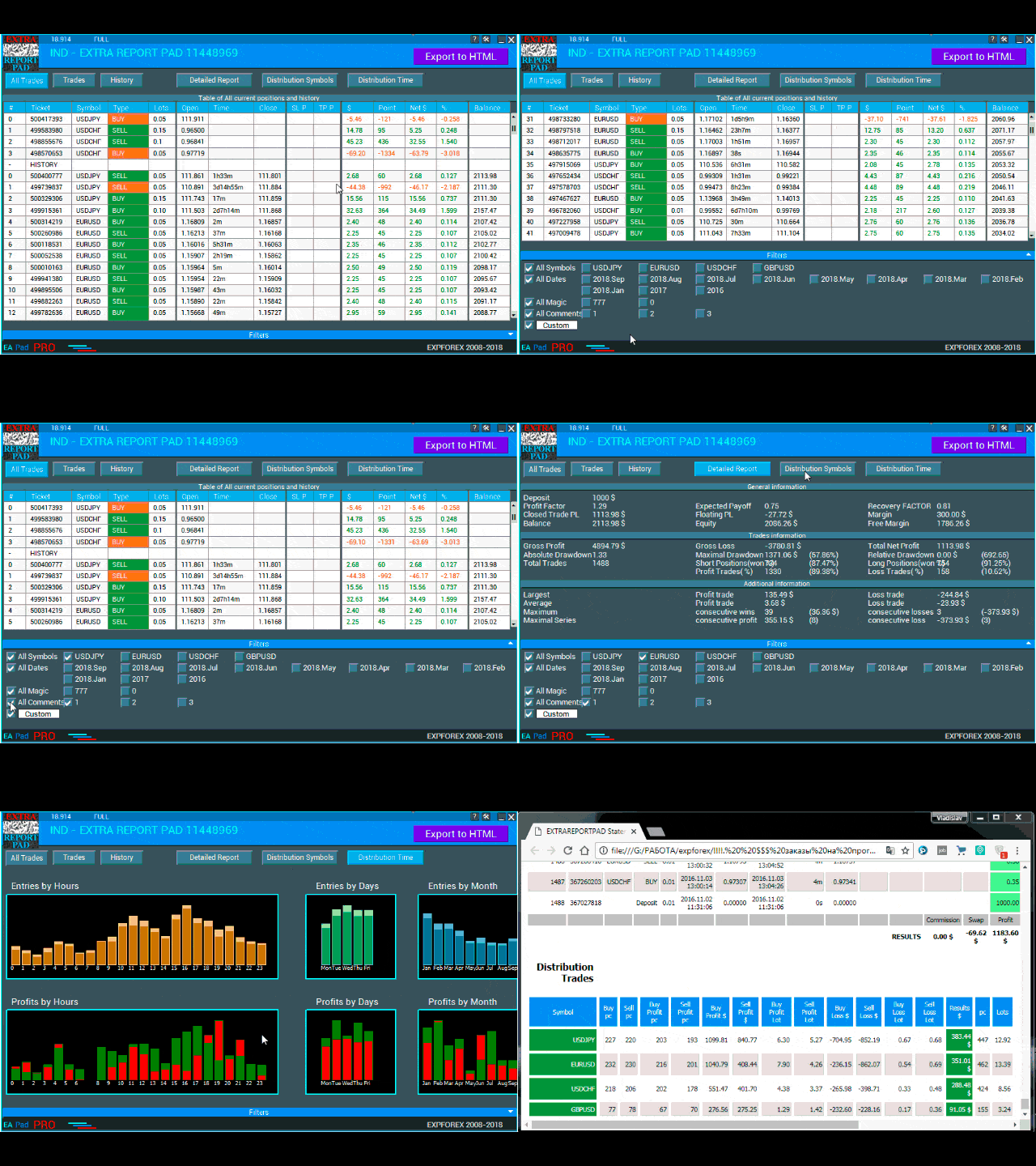
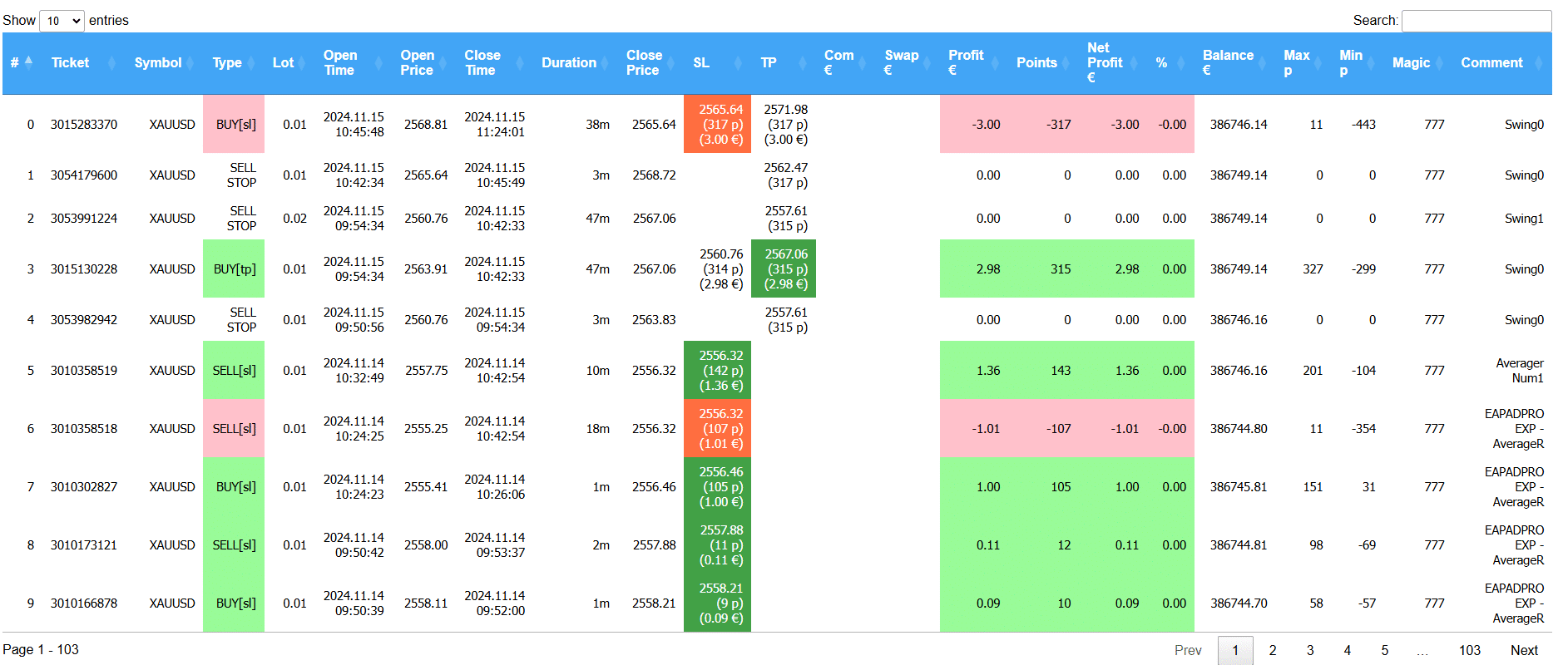
Extra Report Pad รายงานรายละเอียดของการเทรด/คำสั่งที่ปิดแล้วในโหมดออนไลน์
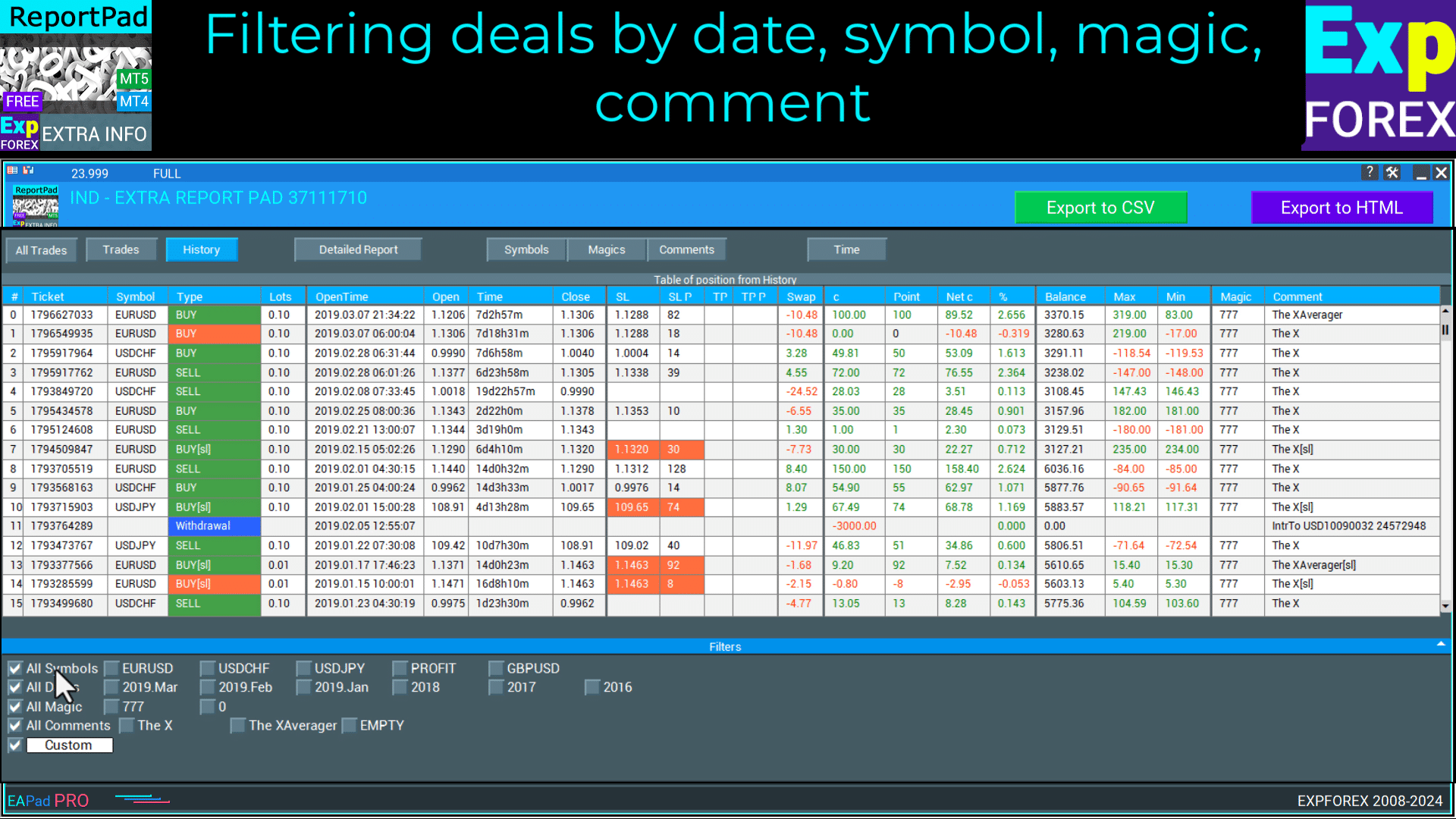
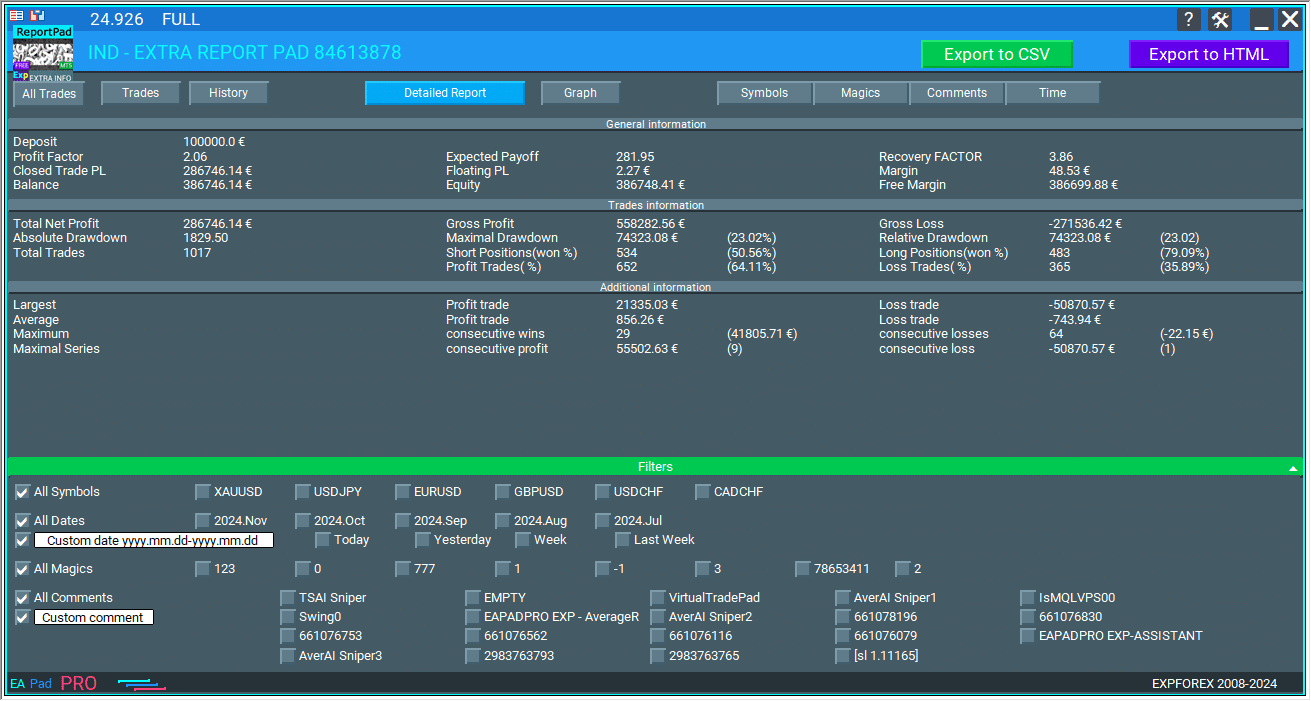
Extra Report Pad การกรองการเทรดตามวันที่, สัญลักษณ์, เมจิก (Magic), ความคิดเห็น
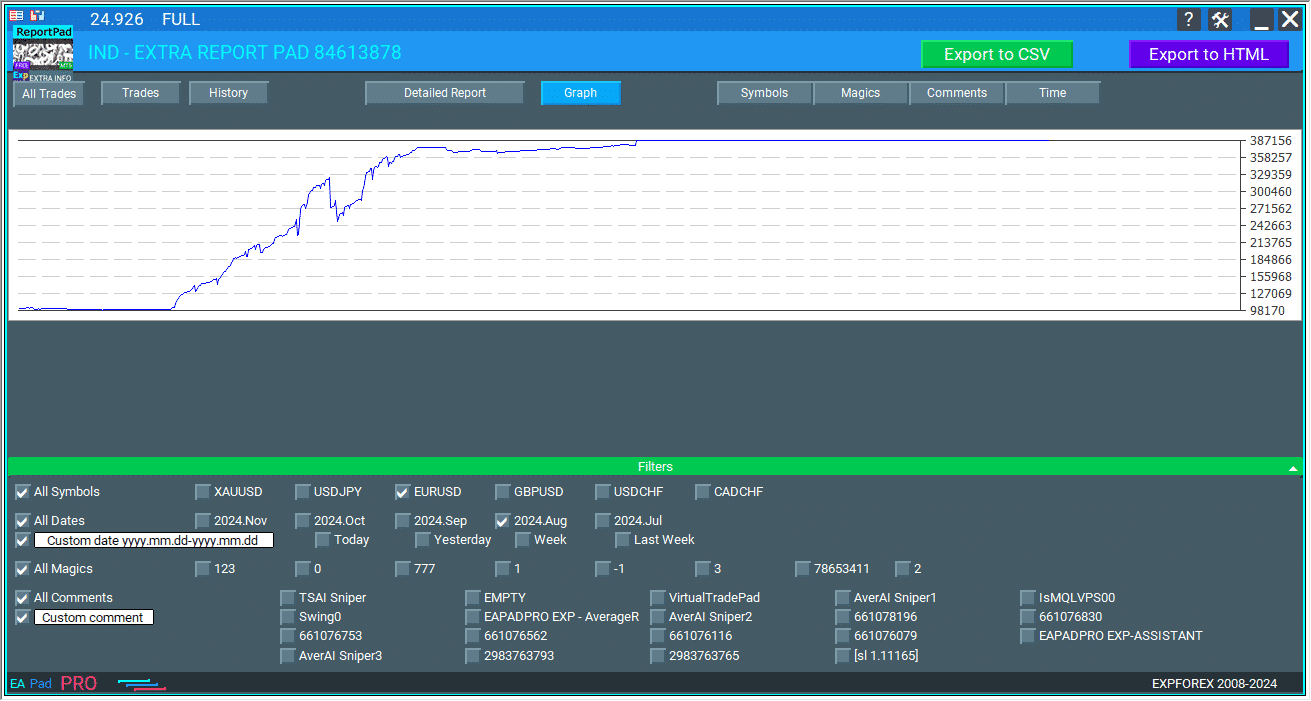
Extra Report Pad กราฟความสามารถในการทำกำไรและรายงานบัญชีปัจจุบัน
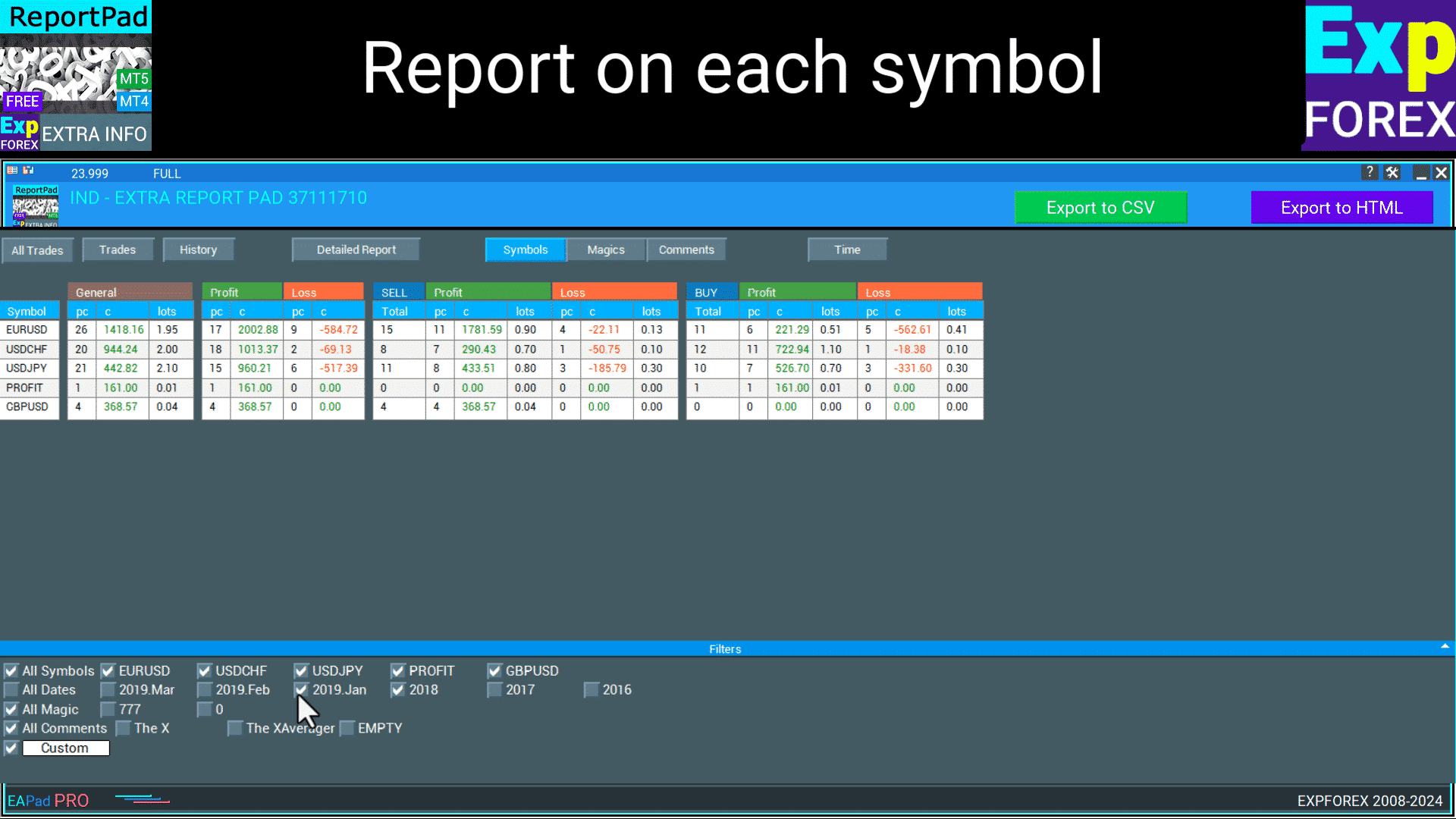
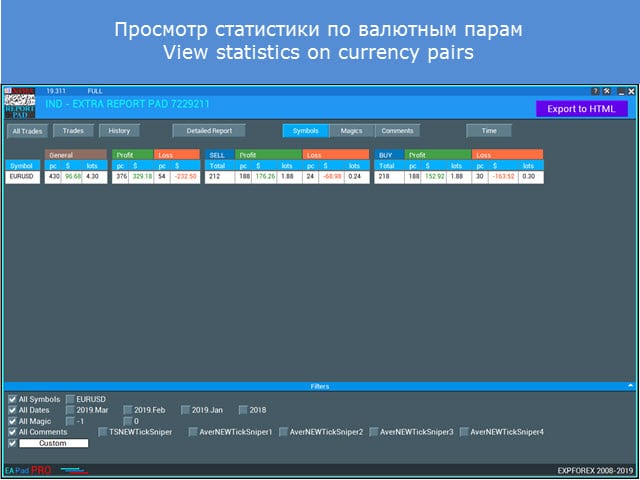
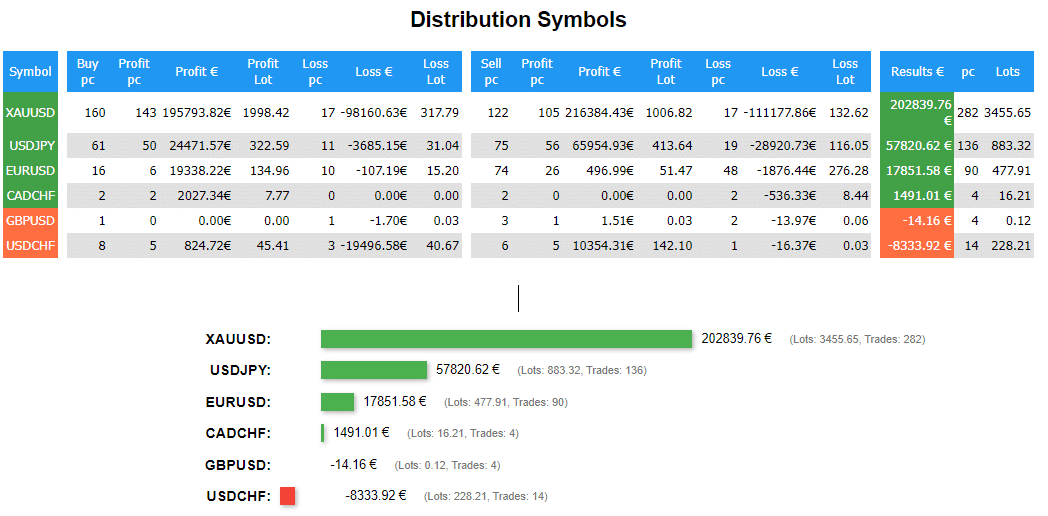
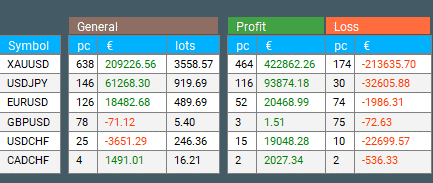
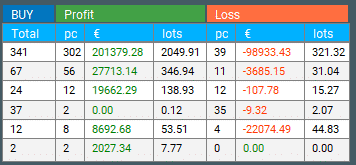
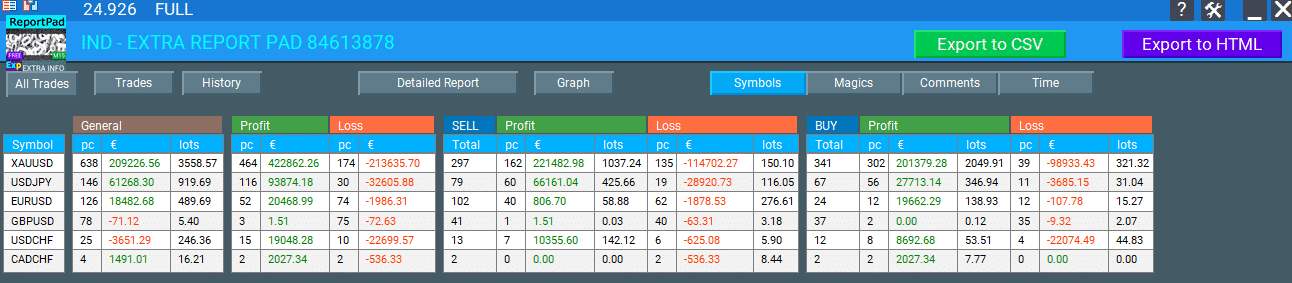
Extra Report Pad รายงานสำหรับแต่ละสัญลักษณ์
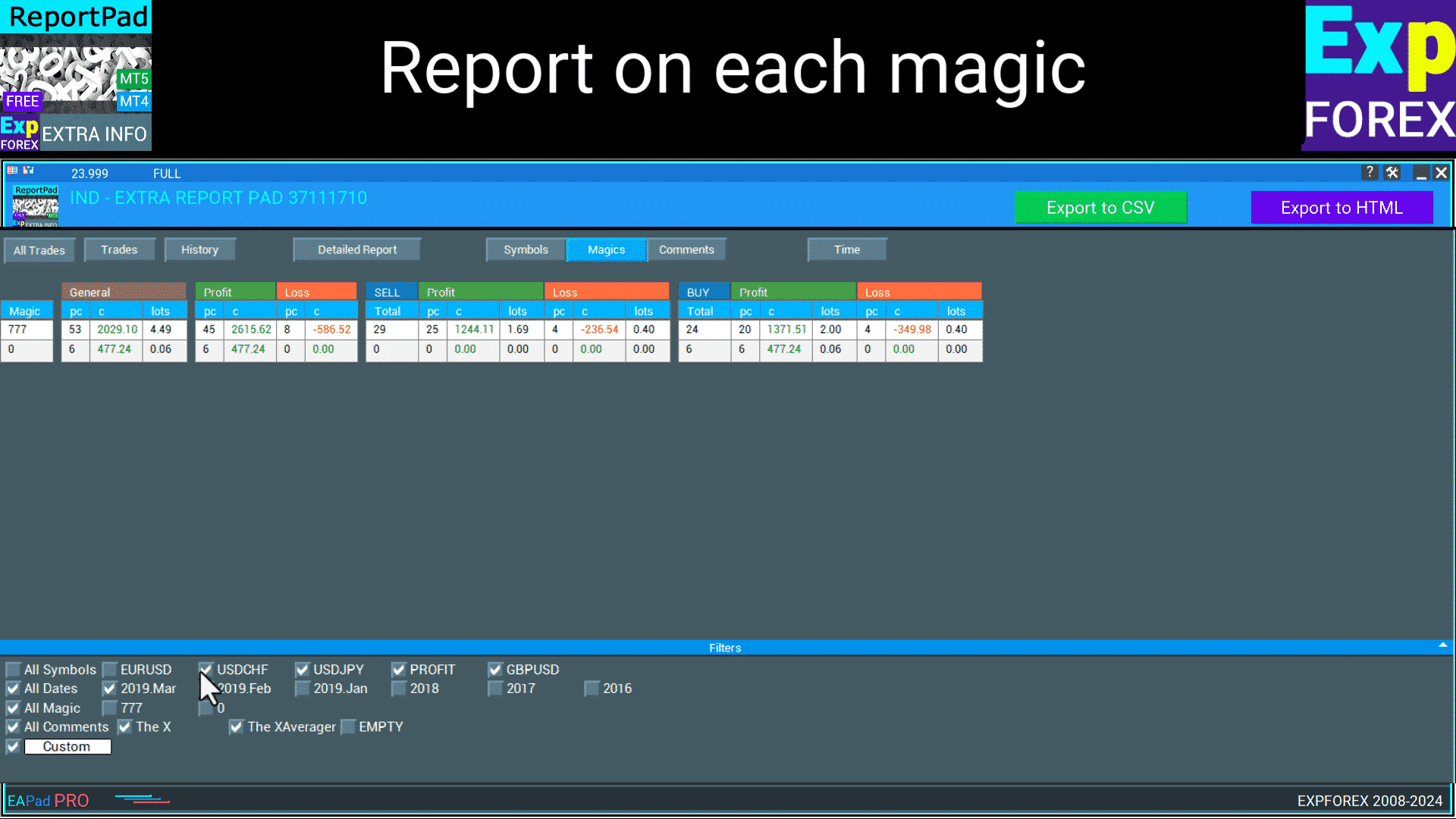
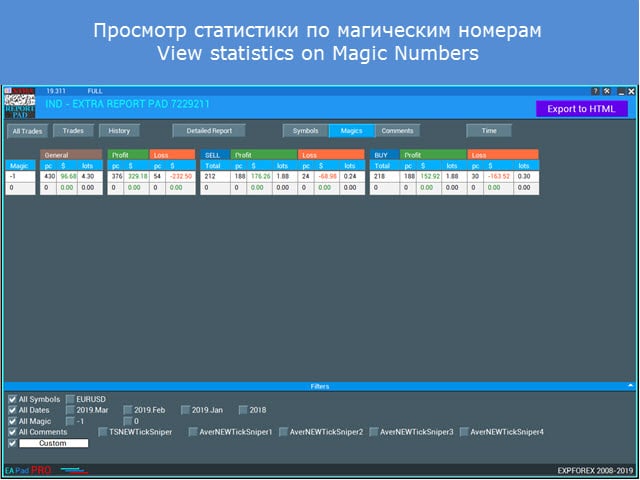
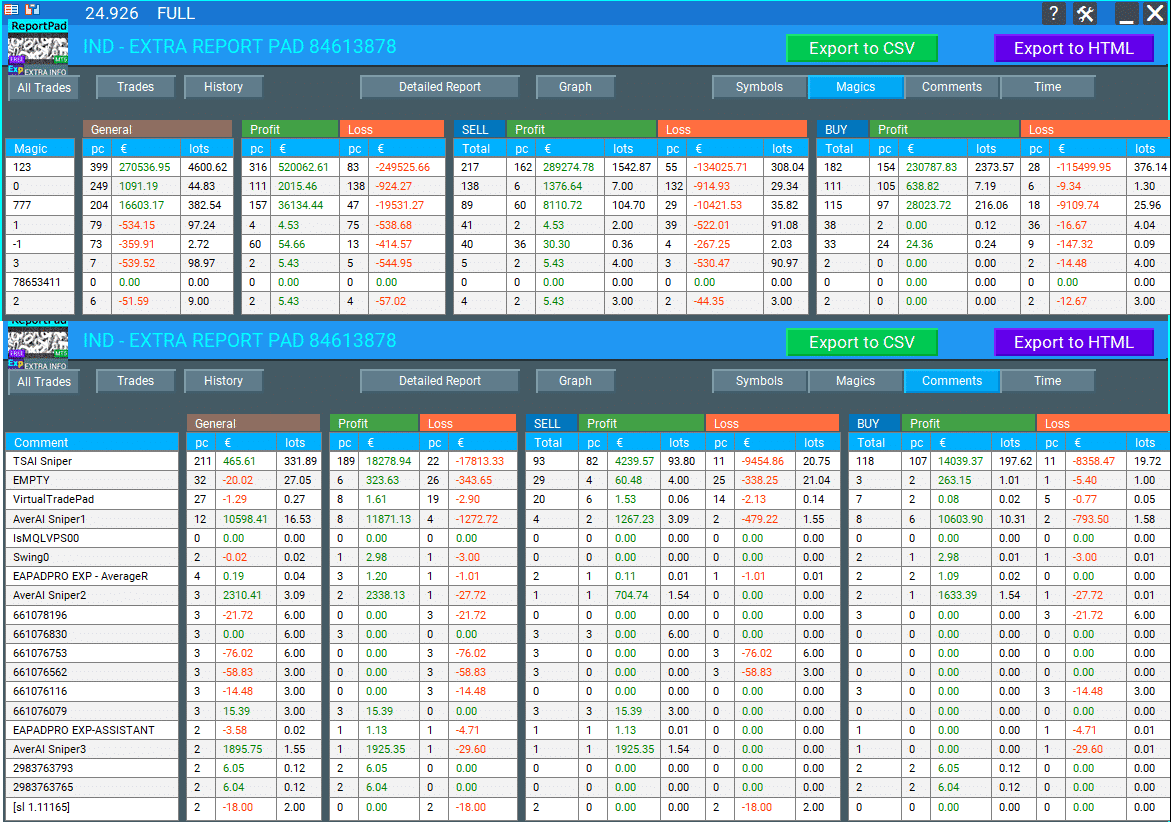
Extra Report Pad รายงานสำหรับแต่ละเมจิก
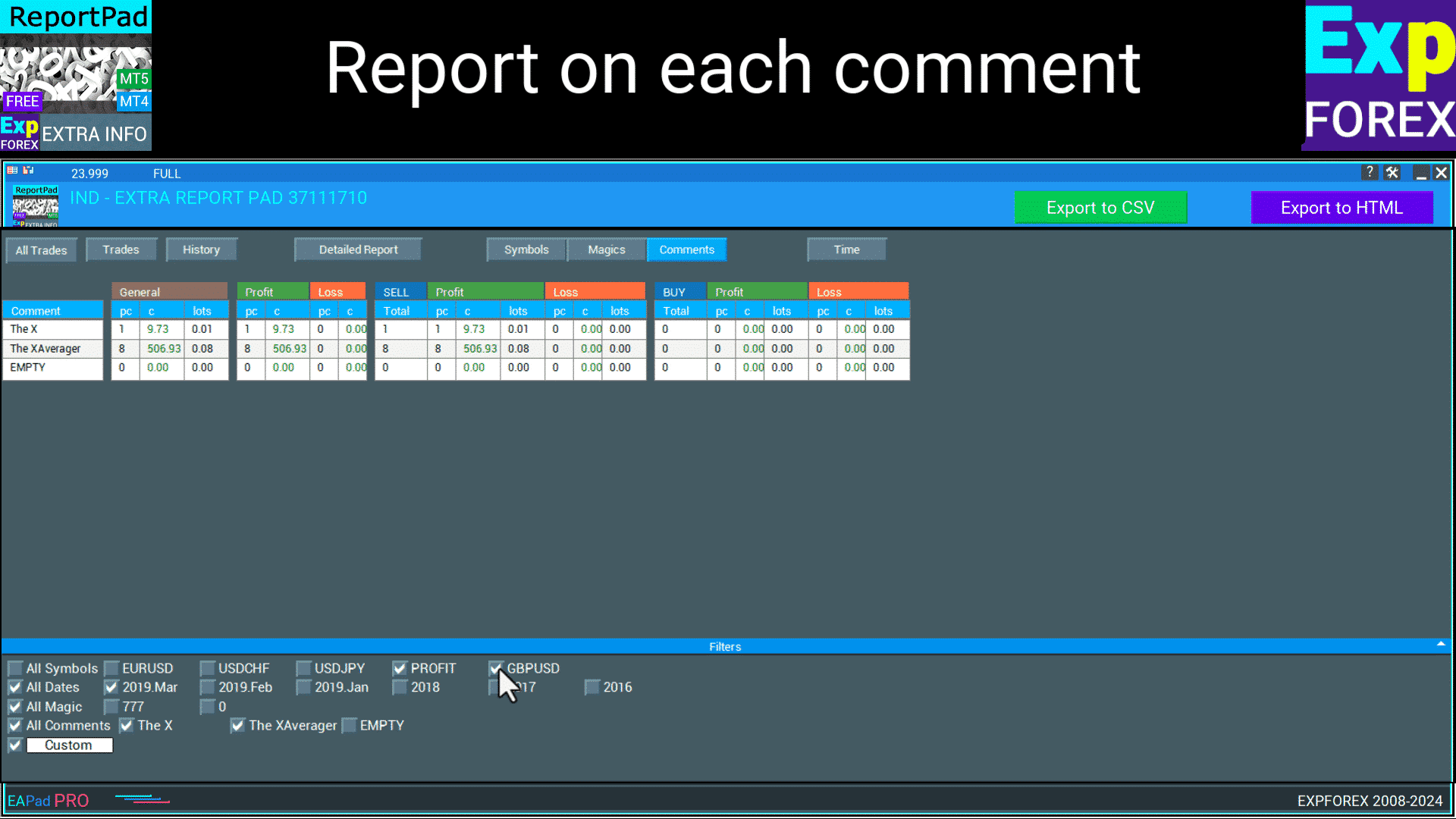
Extra Report Pad รายงานสำหรับแต่ละความคิดเห็น
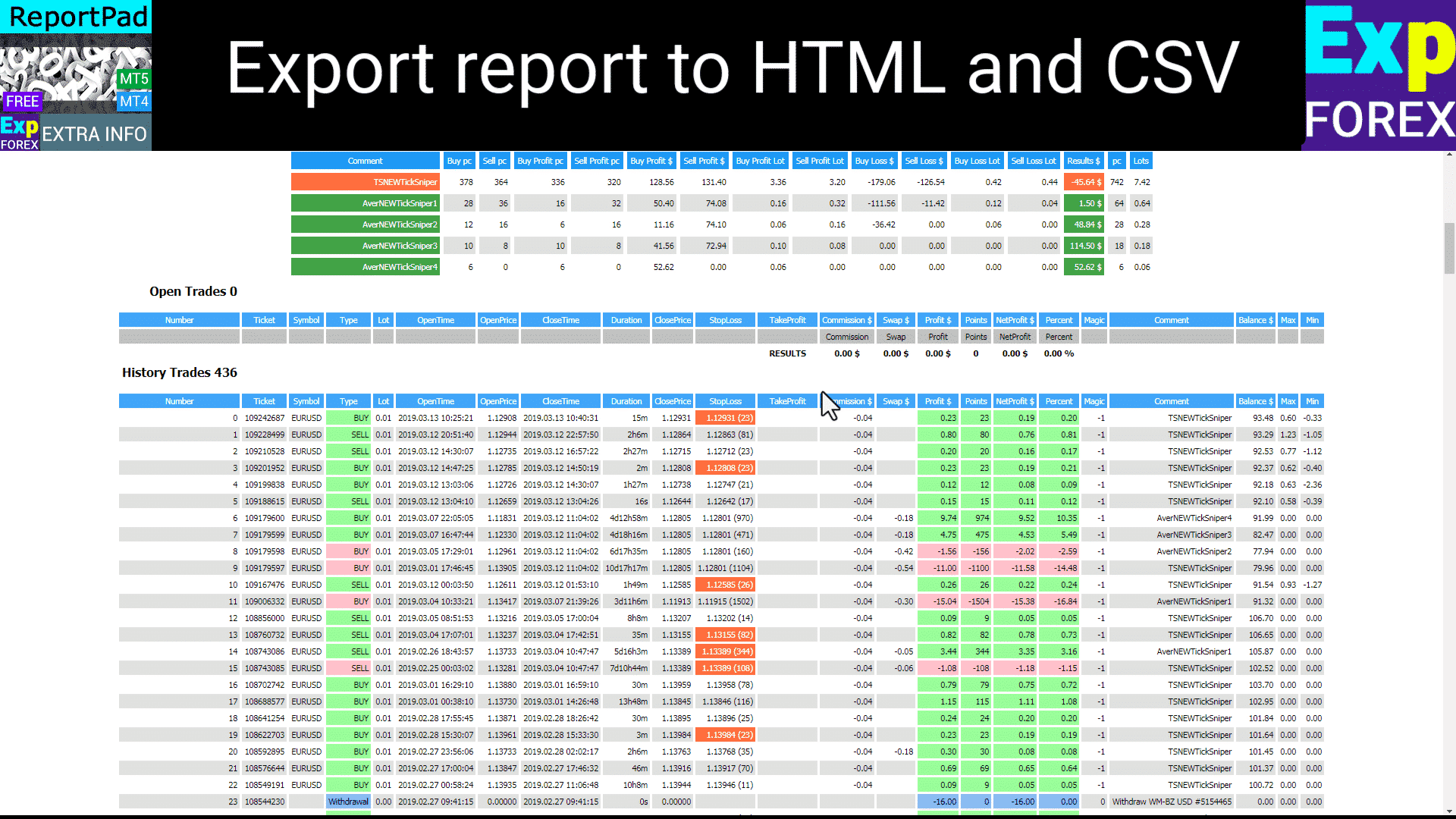
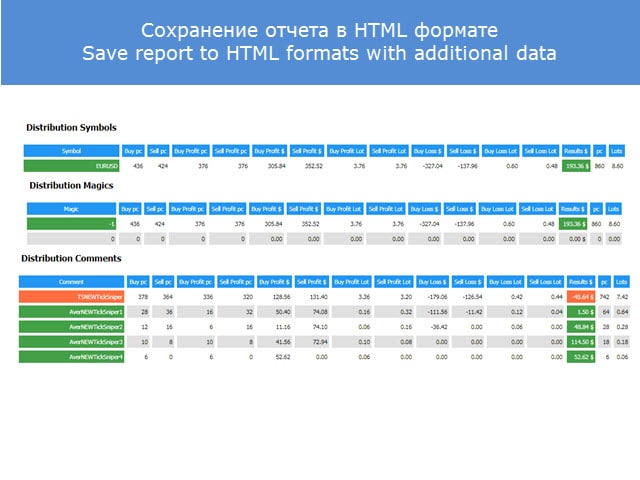
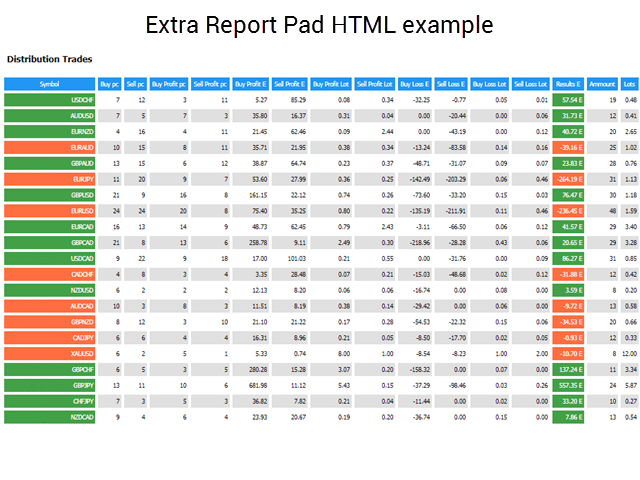
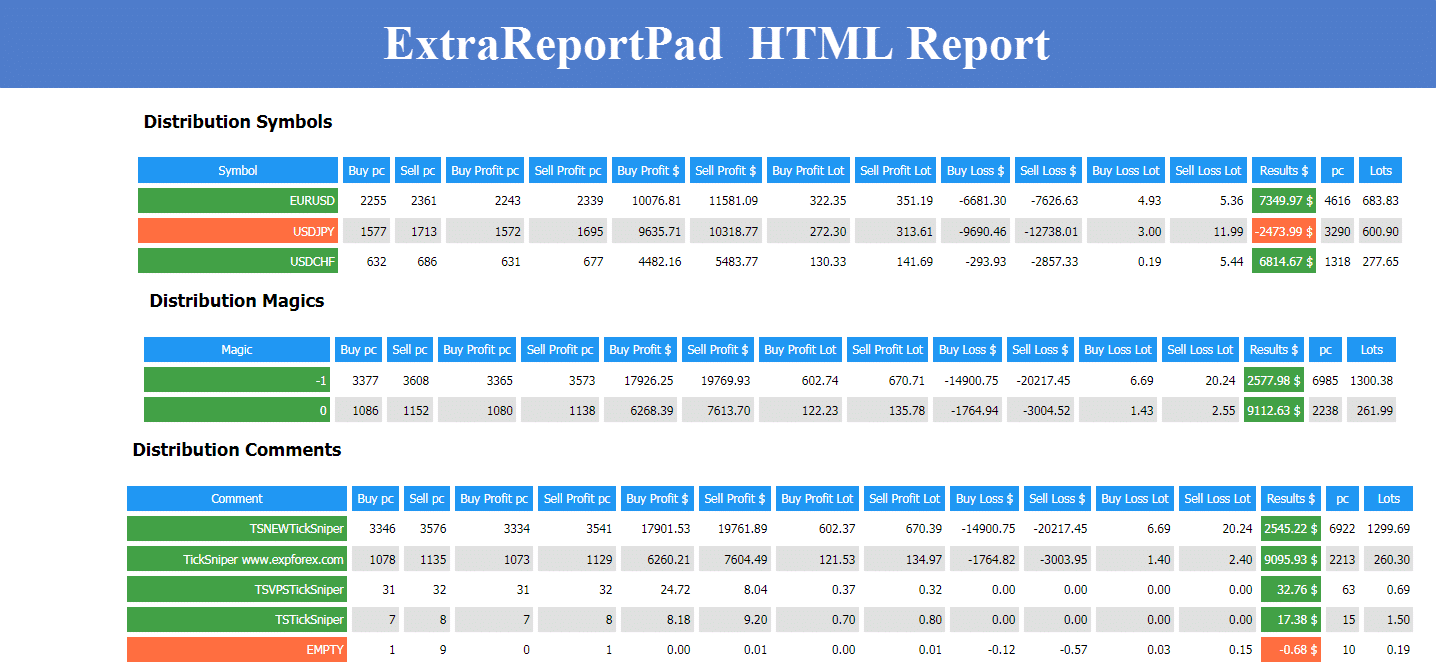
Extra Report Pad ส่งออกรายงานไปยัง HTML และ CSV
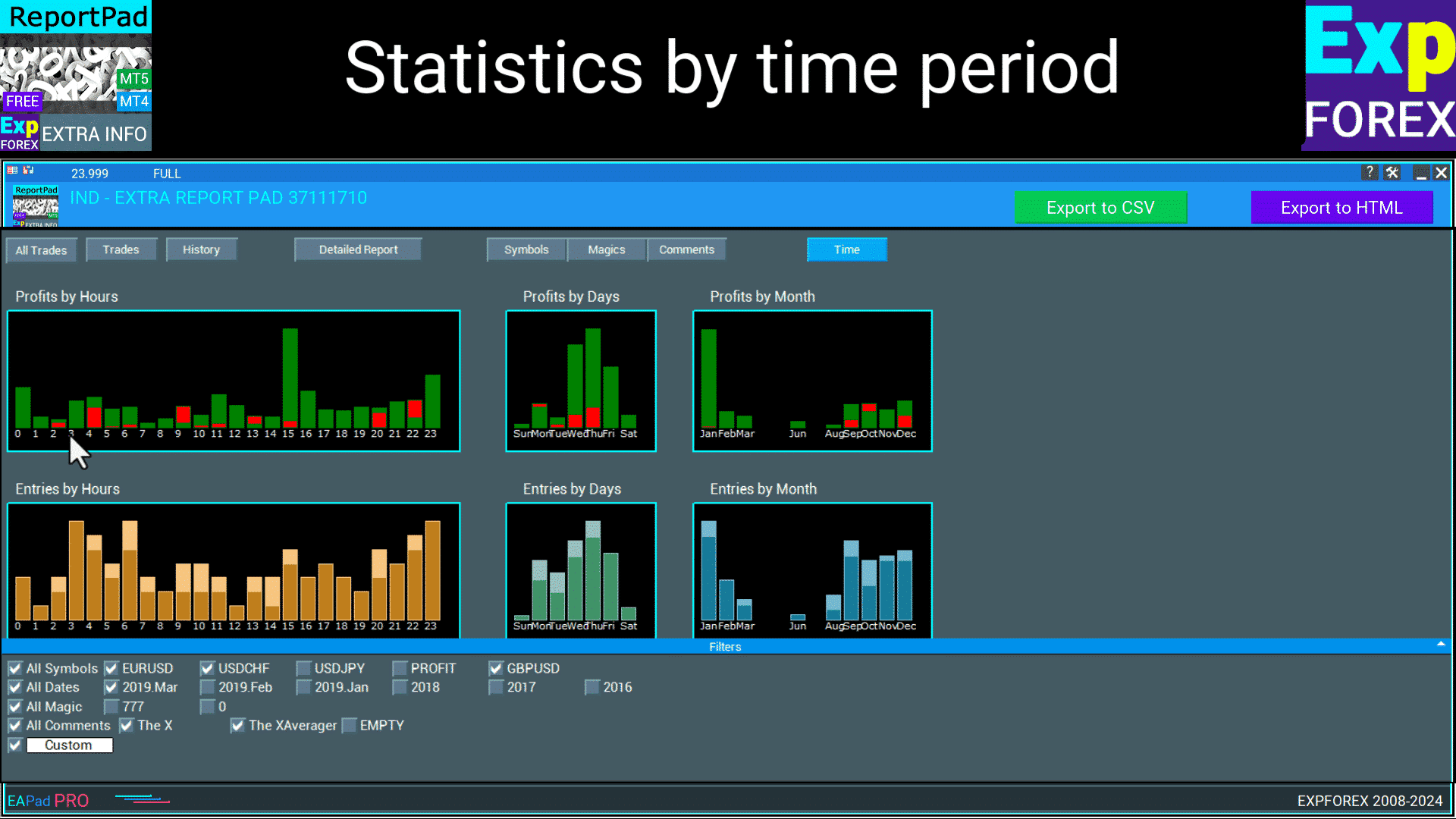
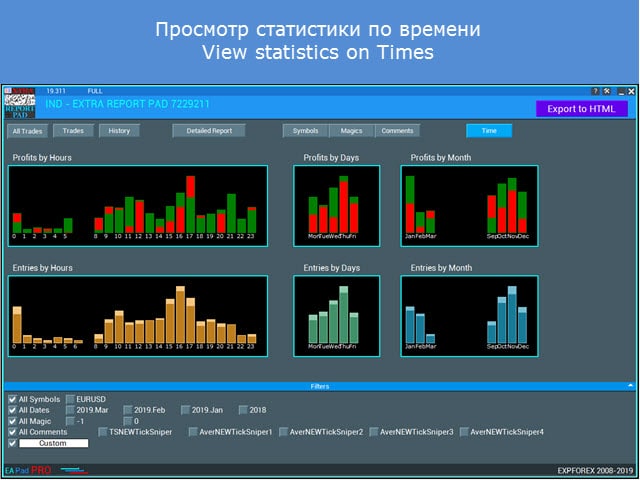
Extra Report Pad สถิติตามช่วงเวลา
Extra Report Pad: ดูสถิติตามเวลา
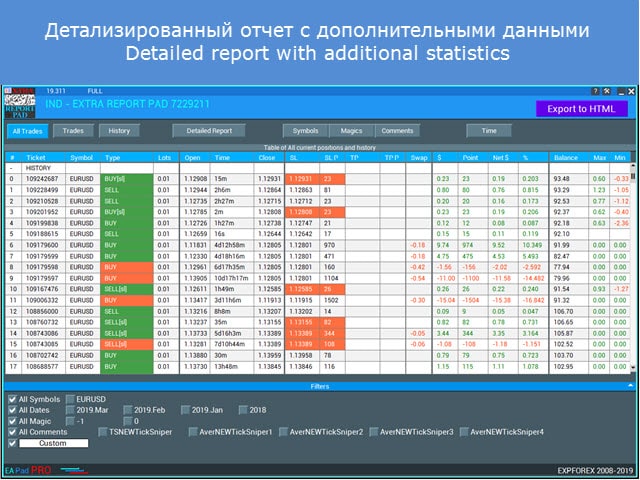
Extra Report Pad: รายงานรายละเอียดพร้อมตัวกรอง
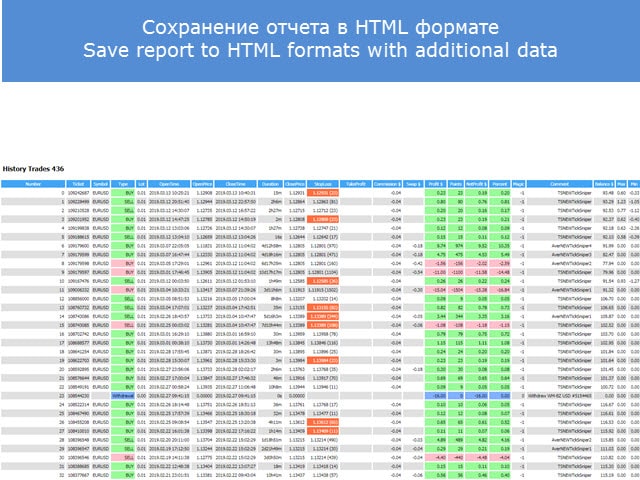
Extra Report Pad: บันทึกรายงานรายละเอียดไปยัง HTML
Extra Report Pad: ดูสถิติตามเมจิก
Extra Report Pad: ดูสถิติตามสัญลักษณ์
Extra Report Pad: บันทึกรายงานรายละเอียดไปยัง HTML
Extra Report Pad: บันทึกรายงานรายละเอียดไปยัง HTML
This indicator is amazing. It also has the max upside watermark and the lowest drawdown that was in profit per trade. Compare it to the actual profit or loss, then use an EA like Account Protector and tell it to take profit or stop loss at the average high watermark and stop loss at at the lowest above the largest drawdowns. It will increase your profits and mimimize your losses. just review your trades daily or weekly and you will find this tool invaluable. And the reports are far better than Metatraders. And it gives you a report analysis of all your trades with win and lose rate, profit ration, lowest overall drawdown, etc. You can also filter your trades by comment or magic number to get a drilled down deeper insight. Great job author!
Yong Chan Kow
Very useful. It can generate reports that include magic numbers, comments and other fields. This enabled me to analyse performance from various angles.
Hristo
Fantastic tool, much better than anything I have seen on the market. I am not sure how the filtering at the bottom is working, for example when clicking on just one Magic number it does say Updating at the top, but the table remains the same with the previous information on it, also if there could be an option to Sort from A-Z / Bigger-Smaller...etc on the actual panel that would be amazing. Also not sure if it has already this function but to be able to display the number of pips/points per magic number or comment would be great because this way easily EA's can be compared between two different platforms with different balance lot sizes. Anyway, it is the best tool I have seen so far. Well done to the developer. Great job.
hwschmidt
Tolles Tool. Sehr viele Informationen die man bisher nicht hatte. Für mich besonders gut weil ich die Daten jetzt besser nach Excel übertragen kann ohne das die Formatierung leidet. Danke
Yusuf Mansawala
It's a useful tool for Fund Mangers and Clients trading with multiple signals or multiple copy trading services, as it can sort out your account statement into a powerful decision making tool.
Fabrizio Malavasi
This reporting app it's a very useful tool to analyse the trades order history.The "Time" button that show the profit/entry along the time It's interesting too. It has a very nice graphic form. You made as usual an excellent job!
Thanks a lots!
เราพบวิธีแก้ปัญหานี้และสร้างอินดิเคเตอร์ EXTRA REPORT PAD ที่สามารถ วิเคราะห์อย่างมืออาชีพ บัญชีของคุณโดยอัตโนมัติและแสดงข้อมูลโดยละเอียด ในโหมดเรียลไทม์!
MyFxBook Mini ถูกรวมเข้ากับหน้าต่างเทอร์มินัลของคุณและอยู่ใกล้แค่ปลายนิ้ว!
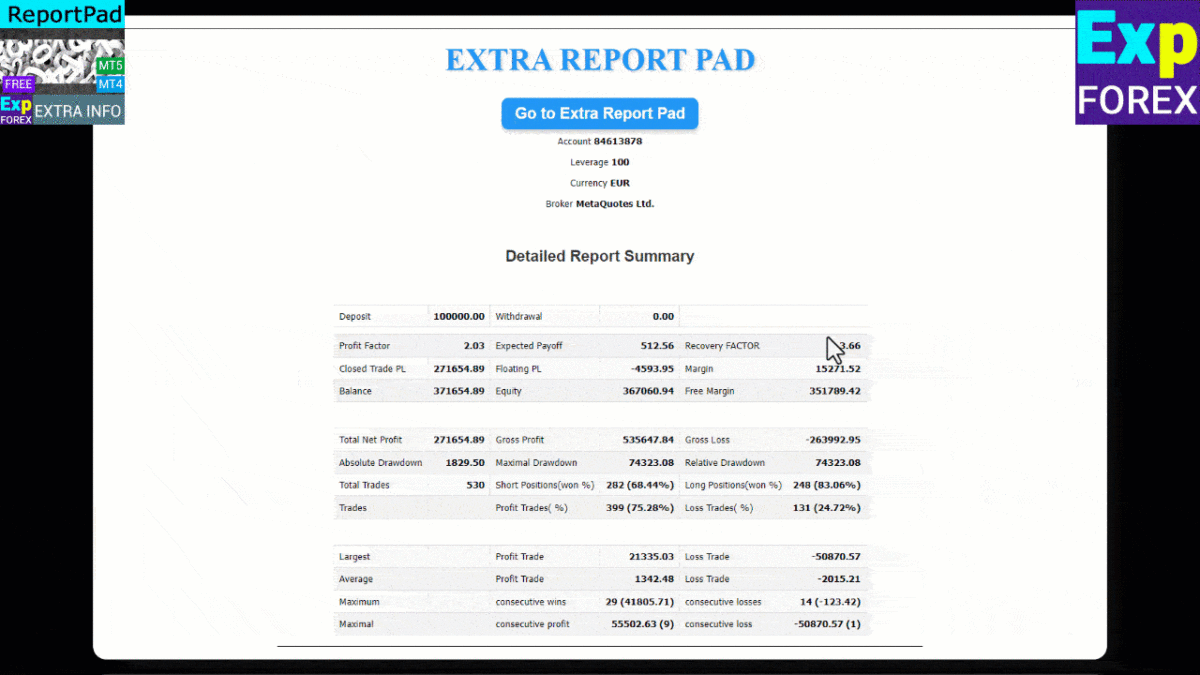
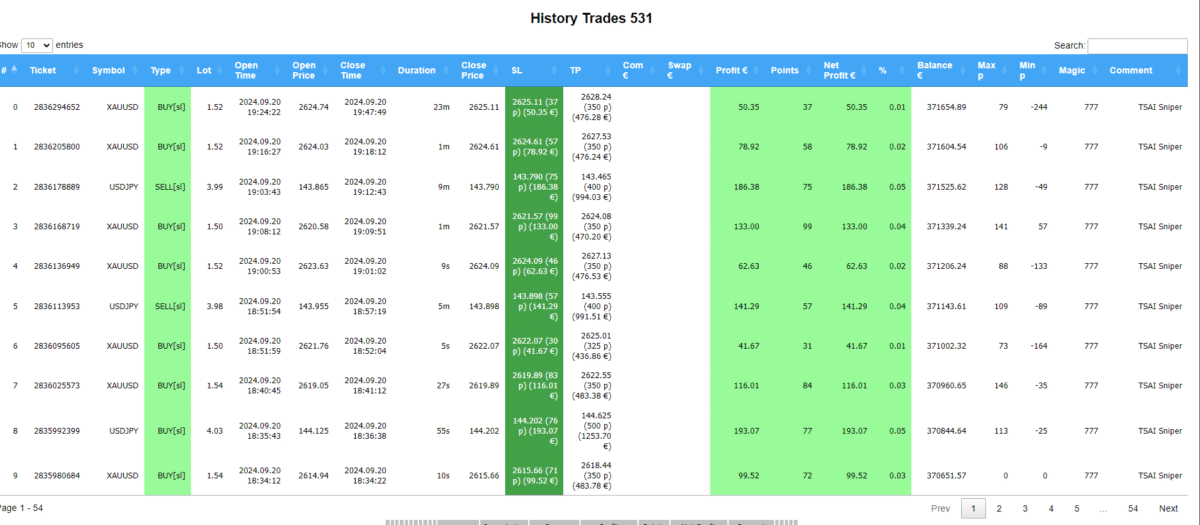
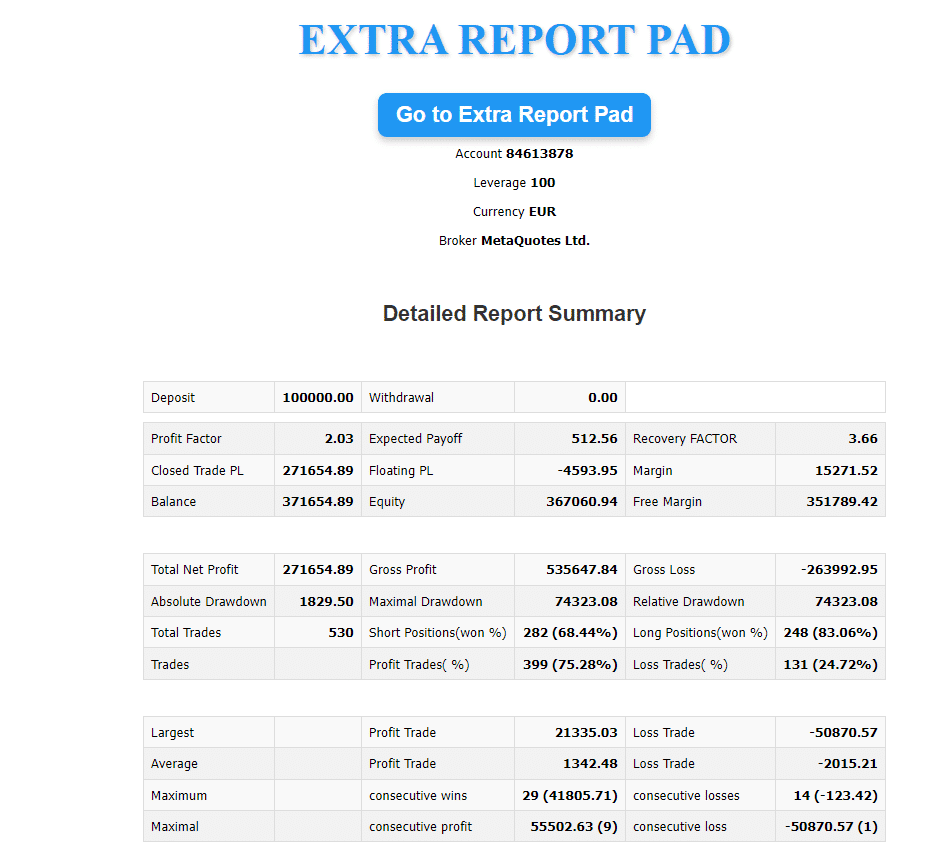
รายงานโดยละเอียดที่อัปโหลดในรูปแบบ HTML มีข้อมูลมากกว่ารายงาน MT มาตรฐานถึง 500%
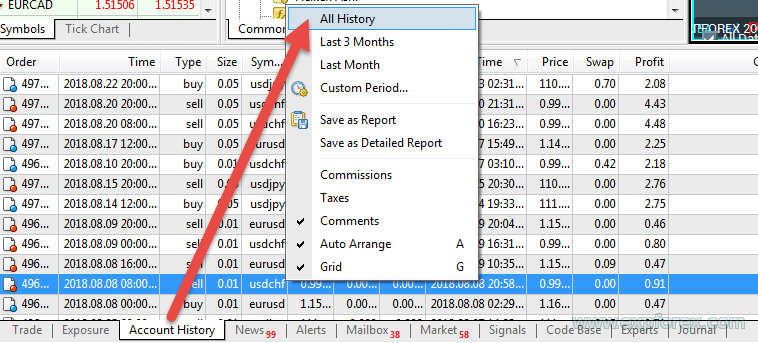
รายงานโดยละเอียดของ MetaTrader แบบเก่า
รายงานโดยละเอียดใหม่ที่สร้างโดย Extra Report Pad
ส่งออกเป็น HTML และ CSV
เราได้เพิ่มปุ่ม ส่งออกเป็น HTML (EXPORT to HTML) ไปยัง Extra Report Pad ซึ่งจะส่งออกรายงานทั้งหมดจากกราฟไปยังไฟล์ HTML แยกต่างหาก การเทรดทั้งหมดจะถูกกรองตามตัวกรองที่ใช้ในแผงควบคุม ตัวอย่างเช่น คุณสามารถเลือกเพียงคู่สกุลเงินเดียว หมายเลขเมจิก (Magic Number) ที่เฉพาะเจาะจง หรือเดือนที่เฉพาะเจาะจง รายงานที่สร้างขึ้นจะมีเฉพาะข้อมูลที่กรองแล้วเท่านั้น
Extra Report Pad สามารถจัดการคู่สกุลเงินหลายคู่พร้อมกันได้หรือไม่?
คำตอบ: ใช่ Extra Report Pad ได้รับการออกแบบมาเพื่อจัดการและวิเคราะห์คู่สกุลเงินหลายคู่พร้อมกัน ช่วยให้เทรดเดอร์สามารถติดตามการเทรดหลายรายการในคู่สกุลเงินต่างๆ ได้พร้อมกัน ทำให้จำเป็นสำหรับกลยุทธ์การเทรดสมัยใหม่ที่เกี่ยวข้องกับการเทรดหลายสกุลเงินพร้อมกัน เครื่องมือนี้ช่วยลดความซับซ้อนในการจัดการการเทรดจำนวนมากโดยการให้ข้อมูลทางสถิติที่ละเอียดและเป็นระเบียบ
มีภาษาใดบ้างสำหรับ Extra Report Pad?
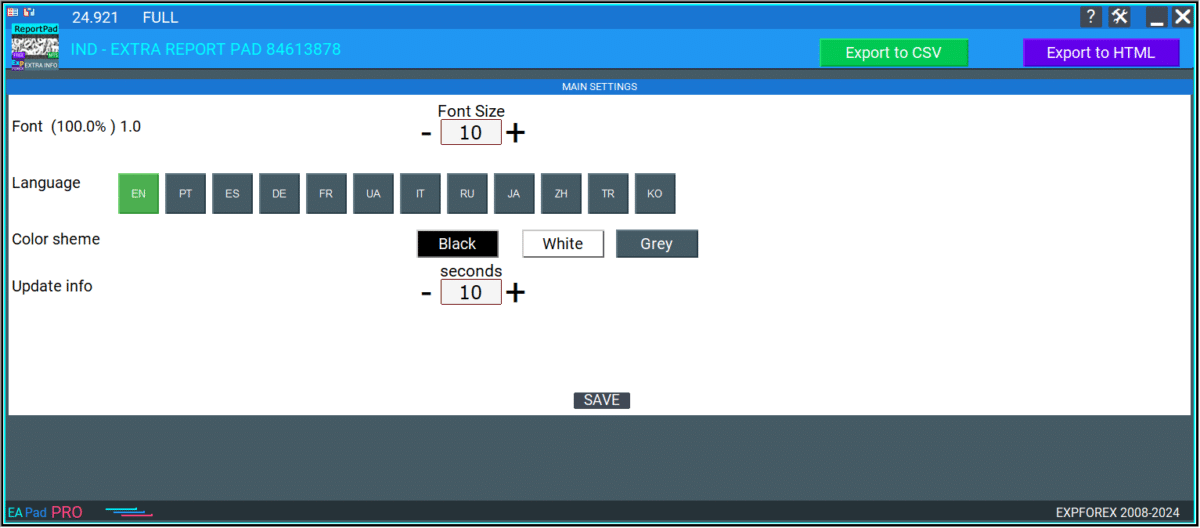
คำตอบ: Extra Report Pad รองรับหลายภาษาเพื่อตอบสนองฐานผู้ใช้ที่หลากหลาย ภาษาที่ใช้ได้รวมถึง:
How does Extra Report Pad enhance trade analysis compared to standard MetaTrader reports?
คำตอบ: รายงานมาตรฐานของ MetaTrader ขาดข้อมูลโดยละเอียดเกี่ยวกับการเทรดรายบุคคล คู่สกุลเงินที่ทำกำไร และสถิติรายเดือน Extra Report Pad แก้ไขข้อจำกัดเหล่านี้โดยให้:
🚀 Changelog — Extra Reports Performance & Graph Upgrade
⚡ Filter engine optimized
Filter calculation at startup is now much faster.
On an account with 20,000+ deals, filters loaded in about 2.02 seconds instead of around 22 minutes in the previous version.
🧩 Added comment group filters
New option: FilterUseCommentGroups
Similar Expert Advisor comments can now be grouped into one filter.
Example:
VirtualTradePad, VirtualTradePad Avg, VirtualTradePad ADD, VirtualTradePad Sig, VirtualTradePad ATM
are grouped as:
VirtualTradePad *
📈 Balance graph improved
The graph now automatically adjusts its height to the chart window.
📊 Added new graph lines
Added separate display for:
Balance line, Equity Min, Equity Max, and Min/Max Equity zone.
🎛 Added graph controls
Users can enable or disable graph layers:
Balance, Max Equity, Min Equity, Equity Zone, Trade Markers, Balance Operations.
🔍 Added zoom and navigation
The balance graph now supports:
Zoom + / -, move left / right, and reset view with 1:1.
✅ Result
Extra Reports now loads faster, works better with large histories, and provides a clearer view of balance, equity range, and drawdown.
Version 26.2272026.02.27
ExtraReportPad has received a business-grade Premium 2026 update ✨, aligning the panel’s visual system with the Expforex 2026 website style for a cleaner, more product-ready workflow. A new Premium color scheme 🎨 has been introduced to improve contrast, readability, and overall clarity during daily use in MetaTrader.
The internal codebase has been updated and refined ⚙️ to strengthen stability, streamline UI behavior, and improve maintainability for future development. Table usability is now more precise: row hover highlighting 🖱️ has been added to make navigation faster and reduce visual friction when reviewing report lines.
Auto-sizing has been improved 🔧 to deliver more consistent layout behavior across different chart sizes, terminal scaling, and panel widths, minimizing unexpected shifts. The Filters block has been refreshed 🔎, and a key productivity upgrade is now included: filter selections are persisted ✅, so after a terminal restart ExtraReportPad restores the same filter state exactly as it was before the reload.
The Balance Graph has also been upgraded 📈 with profit/loss markers displayed directly on the curve based on trading history. Hovering a marker reveals full details for the selected date 💡, enabling quicker insight and more confident performance analysis.
Finally, the HTML layer has been modernized 💎 with a premium balance chart and a complete rebuild of the HTML structure to match the Premium 2026 design language, ensuring consistent branding and a more polished presentation throughout the tool.
Version 25.9772025.12.01
⭐ ExtraReportPad — NEW MAJOR UPDATE
Professional account report FREE
🔹 ExtraReportPad MT4: https://www.mql5.com/en/market/product/15056
🔹 ExtraReportPad MT5: https://www.mql5.com/en/market/product/36730
📰↔️↔️↔️FULL GUIDE for ExtraReportPad: https://www.mql5.com/en/blogs/post/688893
🌐↔️↔️↔️FULL GUIDE for ExtraReportPad: https://www.expforex.com/?p=55
▶️YouTube: https://www.youtube.com/watch?v=K-OUdgLQRfg
🔄EAPADPRO v67:
🎨 Improved MT5 Graphics Compatibility
-Enhanced visual rendering for MetaTrader 5.
-Preparatory optimizations completed for integration with the upcoming new graphical engine.
🔤 Universal Font Upgrade
-The previous panel font Roboto has been replaced with the universal Tahoma font.
-Tahoma is supported across all Windows versions, ensuring stable and consistent text display on any system.
🐞 Minor Fixes & Technical Improvements
-Numerous small bugs and UI inconsistencies have been resolved.
-Optimized internal code structure for better stability and performance.
-Fully recompiled using the latest terminal build, ensuring compatibility and smooth operation in current MetaTrader versions.
Version 25.7242025.07.24
MT4Orders UPDATE
Version 25.3102025.03.14
he "Symbol Representation, Magics, Comments" tabs now exclude rows with zero values!
Added the AutoSize parameter — automatic font size adjustment to fit the screen width when the indicator is initially set.
The AutoSize limit has been increased to 25.
Version 25.1112025.01.12
EAPADPRO v61
We are excited to introduce new languages to our functionality. Users can now enjoy an even wider range of language options for their convenience and comfort. Here’s the list of newly added languages:
THAI=12 — Thai
INDI=13 — Hindi
MALAY=14 — Malay
INDONEZIA=15 — Indonesian
ARAB=16 — Arabic
VETNAM=17 — Vietnamese
BALKAN=20 — Balkan
POLAND=21 — Polish
CHEZH=22 — Czech
Update your application and enjoy working in your native language! 🌐
Version 24.9262024.09.26
-- Modified data markup in the Filters block.
Version 24.9242024.09.22
-- When loading the indicator onto the chart, trading levels and trading history are now disabled to prevent overlapping objects.
-- Added Stop Loss and Take Profit values in the deposit currency to the Stop Loss and Take Profit fields (Show_SLCurrency and Show_TPCurrency in the settings).
-- Introduced a parameter for filtering history by a custom date:
DatesOfHistory = "Custom date yyyy.mm.dd-yyyy.mm.dd"; // Custom Dates of history Start-End: yyyy.mm.dd-yyyy.mm.dd
Set in the format: StartYear.StartMonth.StartDay-EndYear.EndMonth.EndDay.
You can forcibly specify the history period that the indicator will use.
For example: 2024.09.15-2024.09.21
Version 24.9212024.09.21
-- Compiled for the latest versions of MetaTrader terminals.
-- Minor bug fixes to enhance performance.-- Major overhaul of language translations.
-- New languages added: Ukrainian, Portuguese, Spanish, Italian, French, German, Chinese, Japanese, Korean, and Turkish.-- HTML reports can now be generated in multiple languages, with all words and phrases translated into the 12 main interface languages.
-- Significant improvements to HTML reports:
-- -- Enhanced user interface for better usability.
-- -- Added histograms to "Overview" tables, displaying key metrics categorized by comments, magic numbers, and symbols.
-- -- The history table is now paginated for improved readability and reduced system resource usage.
-- -- Columns in the history table can now be sorted by selected parameters.
-- -- A search feature has been added to the history table, allowing users to find specific tickets in the report.
-- -- The balance graph is now interactive, displaying additional information when hovering over points, showing balance details for the selected time.
Version 23.9992023.12.27
LAST BUILD
Version 23.9132023.09.20
-EAPADPRO v44
-Last Build Compilation
Version 22.2082022.02.08
Обновление MT4Orders
Version 22.1212022.01.19
Update Update
Version 22.1202022.01.19
-Updating the design of the HTML report.
-Update MT4Orders
Version 22.1192022.01.18
Update Update
Version 22.1182022.01.18
Update filtering by comments.
All [sl] [tp] comments will be moved to a single group to the main comment:TickSniper = TickSniper[sl] = TickSniper[tp] = [sl]TickSniper = [tp]TickSniper ;
Version 22.1102022.01.12
Fixed a bug with drawing objects for new versions of MT5 terminal
Version 21.9912021.12.12
Update MT4Orders
Version 21.9862021.11.25
Update Update
Version 21.9852021.11.25
Correction of a report error when calculating Profit Trades in the presence of Pending Orders that are different from
"canceled "comments.
Version 21.9442021.11.12
Optimization of the code and the speed of the indicator.
Version 21.9412021.10.10
Версия 21.941
Version 21.9402021.10.10
- Modification of the drawing function to increase the speed of the History tabs!
- Increased the speed of the indicator due to the use of CACHE account history data.
- Added Debug functions to explore ways to minimize system load.
Version 21.9232021.09.23
Recompiling in the latest version of the terminal
Version 21.9102021.09.08
FixFixFixFixFix
Version 21.9092021.09.08
Metaparameter for Excel added to CSV Export: sep =; to correctly define the "Separator" for our CSV report;
Version 21.9082021.09.07
The "Chart" section, when using filters, can now show the balance line separately for the selected filters, without taking into account the change in the total balance on the account.
Version 21.9072021.09.07
Улучшение отображение графика
Version 21.9062021.09.06
-Added Graph Tab: Displaying a balance graph based on your trading account.
The balance chart is built on the basis of the History of trade deals and the selected filters!
When exporting a report to HTML, the balance chart will be additionally saved.
Balance chart added to HTML report!
-General performance and graphics improvements.
Version 21.6132021.06.13
-New sections have been added to the Dates filter block: Today / Yesterday / Current week / Previous week;
--Attention: For correct filtering of this data, it is necessary that the indicator be set to a symbol with a loaded history of quotes (at least for a month)
-Added a subsection to the "Time" block - Lots by day / week / month, displaying the profitability of such data.
-Changing the color scheme of the "Time" section for a more understandable display of information;
-Updating EAPADPRO, according to the new rules for using the MQL5 Market;
Version 21.6052021.06.03
Optimization of the code and a significant increase in the performance of the indicator.
Version 21.6012021.06.02
- MT4Orders update for Ind version - ExtraReportPad MT5;
- Added parameter FilterOnlyif2orMore - Take into account and form the list of comments / magic in filters only if there are 2 or more identical deals in the comment / magic.
Previously, we did not take into account the comment / magic of only 1 deal in the filtering (Filters tab),
since some advisors use the comment / magic field as a unique ticket number!
In order not to overload the filter system,
we have not included such single trades for filters.
- Added all deals of one comment with the prefixes [sl] and [tp] to the filtering mode by comments
- Added "Export to CSV" button - exports text data to Excel - CSV format!
For some needs and requests, we made a report output in CSV format - this format is needed to form your own criteria in Excel tables.
This mode is not as pretty as the HTML report, but it is suitable for generating your own reports from the data!
- Added restriction on the number of filtered items to the filter tab.
- Sorted in Symbols / Magics / Comments from highest to lowest.
Also filter names by Symbol / Magic / Comment are sorted from highest to lowest.
Version 21.12021.01.11
- Added the FilterDepositByTime parameter: When using the time filter, the deposit / withdrawal of funds that do not fall into the time filter are removed from the report.
To filter deposits / withdrawals by time, use FilterDepositByTime = true;
Attention! It is not recommended to enable filtering of deposits / withdrawals because it may affect the calculated data and statistics output.
- Added lots to the TIME table (Time report), when you hover over the data columns, the amount of lots is shown in the tips!
Version 20.9352020.10.15
- Added the ability to rewrite HTML data file for use in EXCEL RewriteHTMLReport:
true = Overwrite HTML file on export.
false = Old version, adds a unique report number to the end of the file name.
--Fixed error in displaying current open deals when using the CustomDate parameter
Version 20.6172020.06.22
MT4Orders update
Version 20.6082020.06.08
Comp[ile 2485
Version 20.2252020.02.26
--Added parameter CreateImages: Save / Do not save images when creating an HTML report.
- When scanning the history, the indicator will automatically add currency pairs that are not in the "market watch", but are in the "Account history".
Attention: For the indicators to work correctly, you must add all currency pairs (Symbols) to the "market watch."
Version 20.2122020.02.13
Update Update
Version 20.2102020.02.10
- Increased data processing speed on accounts with a large history> 1000 positions in history.
- Added LABEL that data is being updated and needs to wait.
- Calculation of Maximal DrawDown and Recovery Factor updated
Version 20.2092020.02.09
--Table separation for HTML report:
Now Open Trades and History Trades are different tables.
For ease of import into Excel
--When saving the report in HTML, images are also saved for easy upload to different sites.
Version 19.8152019.08.15
0. Added the ability to specify the reporting period in Filters in the format: yyyy.mm.dd-yyyy.mm.dd
Attention! Carefully check the date request format: yyyy.mm.dd-yyyy.mm.dd, for example: 2018.05.25-2018.12.25
1. Added variable AccountHolderName = Print the name of the account holder in HTML!
2. In MT5: Added scrolling tables using the mouse wheel.
(Unfortunately, in MT4 there is no function of scrolling with the mouse wheel!)
3. A line has been added to the Current open positions tab with a total statistics of all open positions.
4. Fixed error updating the list of open positions. Data is recalculated when changing the list of open positions.
5. Max and Min balance, the algorithm is updated! The indicator starts to count from the next minute bar after opening a position.
6. In the statistics of open positions added time retention of current open positions!
7. Added unit selection (deposit currency, points) in Column_Max and Column_Min columns.
8. When you create an HTML report, the selected filters will be added to the end of the report!
This indicator is amazing. It also has the max upside watermark and the lowest drawdown that was in profit per trade. Compare it to the actual profit or loss, then use an EA like Account Protector and tell it to take profit or stop loss at the average high watermark and stop loss at at the lowest above the largest drawdowns. It will increase your profits and mimimize your losses. just review your trades daily or weekly and you will find this tool invaluable. And the reports are far better than Metatraders. And it gives you a report analysis of all your trades with win and lose rate, profit ration, lowest overall drawdown, etc. You can also filter your trades by comment or magic number to get a drilled down deeper insight. Great job author!
Very good reporting tool - could I ask that in the Export to HTML Magics section to add the comments column? That way it makes it easier to correlate the magic number to the specific EA or trade comment without having to cross match them manually another way.
overall good indicator, delivery valuable information. My only criticism is the CSV export can use some improvements or maybe change it to excel format where you can do much more, otherwise love it.
"Thank you for your feedback! We're glad you find the indicator valuable. Regarding CSV export, MQL only supports CSV format, but it is specifically structured for Excel compatibility. You can easily open it in Excel and work with the data as needed. Let us know if you have any other suggestions!"
The indicator is very intuitive and detailed, suitable for synthesizing long-term performance Hopefully the author can add functions such as: deleting comments, magic number in the indicator's filter list (because after a long time the number will exceed the screen), creating a chart showing Equity/Balance (profit/loss) of the account over time in history.
Jcb Mlwijk
Excellent reporting functionality that provides you with detailed insights into their trading performance. The tool generates trade history reports, including key metrics such as profit/loss analysis, drawdown, and risk exposure.
Ron Inchess
Really useful product, just what I was looking for. The author's site is also interesting. Worth a visit. Some difficulty in configuring the MT5 dimensions. The reports to download are excellent and clear. Very useful for work evaluations.
-
Prodotto veramente utile, proprio quello che cercavo. Anche il sito dell'autore è interessante. Da visitare. Qualche difficoltà a configurare le dimensioni di MT5.I reports da scaricare sono ottimi e chiari. Molto utili per le valutazioni di lavoro.
We use cookies to improve your experience, analyse traffic, and personalise content. You can accept all cookies or customize your preferences.
Cookies are small text files that can be used by websites to make a user's experience more efficient.
The law states that we can store cookies on your device if they are strictly necessary for the operation of this site. For all other types of cookies, we need your permission. This means that cookies categorized as necessary are processed based on GDPR Art. 6 (1) (f). All other cookies, including preferences, analytics, and marketing cookies, are processed based on GDPR Art. 6 (1) (a).
This site uses different types of cookies. Some cookies are placed by third-party services that appear on our pages.
You can change or withdraw your consent at any time from the Cookie Declaration on our website.
Learn more about who we are, how you can contact us, and how we process personal data in our Data Protection Policy and Disclaimer.
Please state your consent ID and date when you contact us regarding your consent.





















































ใส่ความเห็น